Vibe Engineering
You write zero code. You describe what you want — the wizard agents write the code, write the tests, iterate until everything passes, and deploy. Your job is architecture and intent.
1. Setup
npx wao create myapp
cd myapp
yarn start # start the live dashboard (API :3333 + Vite :5174)
npx wao buildnpx wao create scaffolds the full project — dependencies, HyperBEAM (compiled with genesis-wasm), test harness, example handlers, and the complete wizard agent context (knowledge base, skills, rules, hooks, agents). yarn start launches the live dashboard so you can watch build progress in real-time from the start. npx wao build launches Team HyperWizards with permissions enabled.
After setup, the project structure looks like:
myapp/
├── CLAUDE.md # Always loaded: project context
├── .mcp.json # MCP auto-discovery (dashboard tools)
├── plan.md # Feature plan (created by /plan)
├── tasks.json # Task list with status (created by /plan)
├── docs/ # On-demand: 5 reference docs (~2,500 lines)
├── .claude/
│ ├── settings.json # Hooks + permissions + team config
│ ├── rules/ # Auto-injected patterns by file type
│ ├── skills/ # 20 slash commands
│ ├── agents/ # 3 wizard agents
│ └── mcp/dashboard/ # MCP server (get_progress, open_dashboard)
├── src/ # Lua handlers (wizards write these)
├── custom-lua/ # Optional: standalone Lua modules
├── custom-wasm/ # Optional: WASM64 Rust modules
├── test/ # JS tests (wizards write these)
├── dashboard/ # Live dashboard (API server + Vite React)
├── frontend/ # Optional: Vite + React + wao/web
├── scripts/ # Deploy script
└── HyperBEAM/ # Optional: cloned/linked2. Dashboard
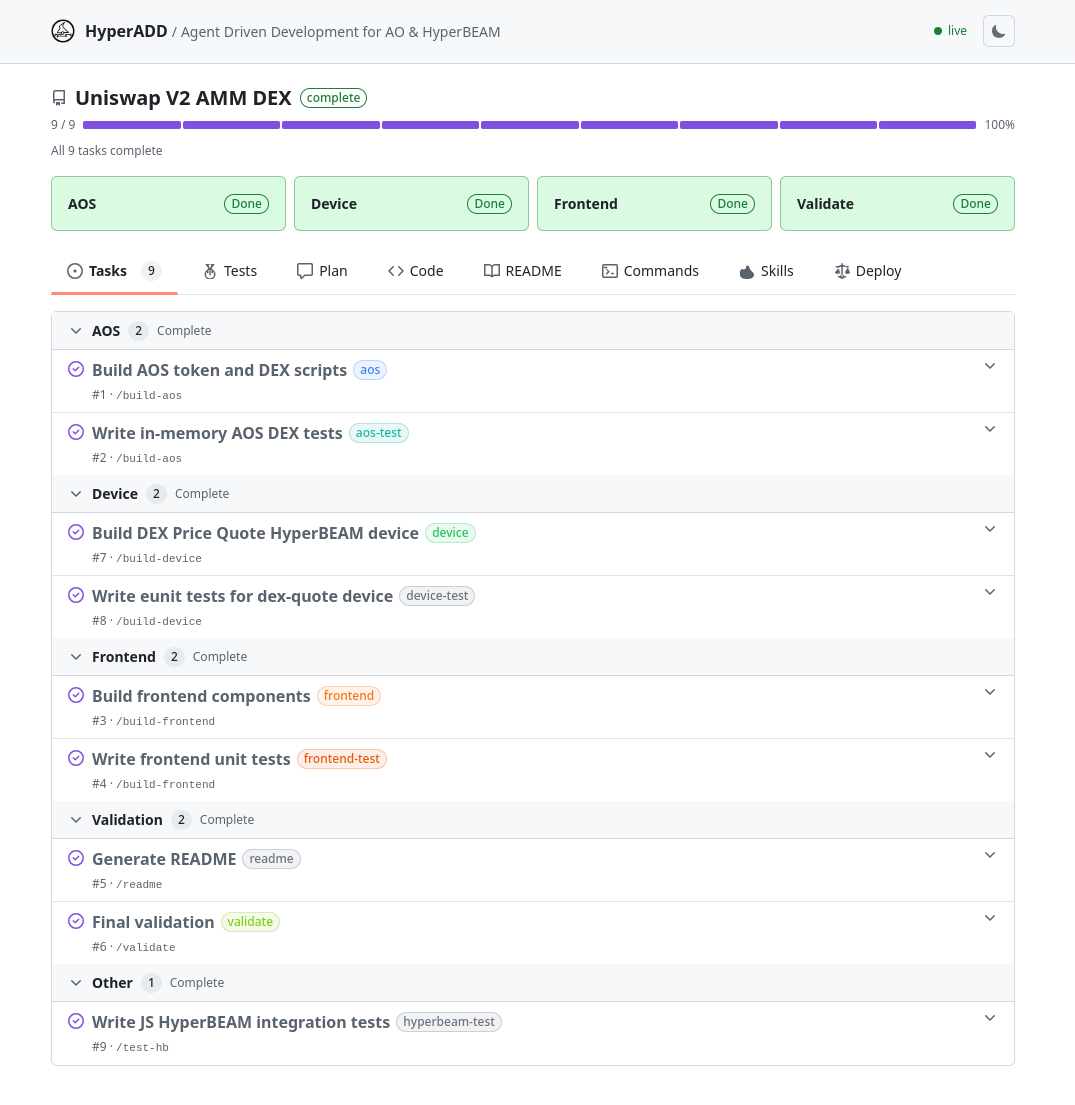
The dashboard you started in step 1 (yarn start) updates in real-time as wizards work. Open http://localhost:5174 to see:
- Feature name and overall progress bar
- Per-track cards (AOS, Device, Custom Module, Frontend) with completion status
- Task list with status, type badges, and completion criteria
- Test results grouped by track with pass rates
- Code browser with file tree navigation
- Commands derived from your actual project files
- Deploy guide with steps for every target
When a wizard marks a task done, the dashboard reflects it instantly.
/report
Run /report in Claude Code at any time for a text summary:
## Progress: Token System
✔ Task 1: Build AOS Lua handlers
✔ Task 2: Write in-memory AOS tests
▶ Task 3: Write AOS HyperBEAM integration tests
· Task 4: Build frontend components
· Task 5: Write frontend vitest tests
Progress: 2/5 done, 1 in progressTeam Mode
For complex features, use /team build to parallelize — each wizard owns separate files (one on Lua handlers, one on JS tests, one on frontend) and builds in parallel without stepping on each other.
3. Plan
Describe what you want to build — behavior, not code. The wizard reads the relevant docs, researches patterns and edge cases, then runs /plan.
Choose Your Tracks
/plan prompts you to choose which components to include:
| Track | What the wizard builds | Where |
|---|---|---|
| AOS | Lua handlers + in-memory tests | src/ and test/ |
| Custom Modules | WASM64 (Rust) or standalone Lua modules + HyperBEAM tests | custom-wasm/ or custom-lua/ and test/ |
| Device | Erlang device modules + inline eunit tests | HyperBEAM/src/ (device + tests in same file) |
| Frontend | Vite + React components + vitest + Playwright tests | frontend/ |
Most projects combine AOS with a frontend. Pick what you need — the wizard only creates tasks for the tracks you select.
Example Prompts
AOS App:Custom Module:I want an AOS app that manages a registry of names. Users can register, look up, and list names. Unregistered users get a clear error. Each handler should have its own test case.
HyperBEAM Device:Build a custom WASM64 counter module in Rust. It handles Inc and Get actions and returns the count. Test it on a local HyperBEAM node.
Full Stack:Build a device called dev_counter. It starts at zero, has increment and get endpoints. Register it as counter@1.0. Increment three times and verify 3.
Build a token system with AOS Lua handlers for mint, transfer, and balance, plus a React frontend with balance display and transfer form using ArConnect.
What /plan Produces
Two files that drive the entire build — and serve as the communication protocol between wizard agents, sessions, and the dashboard:
plan.md — The architecture document. Contains the feature overview, component specifications (AOS scripts with actions/tags/state/replies, devices with exports, frontend components), edge cases, and test scenarios. Starts as PENDING APPROVAL, changes to APPROVED after you confirm.
tasks.json — The structured task list. Every wizard agent reads this file to know what to work on. The dashboard reads it to show progress. Each task has:
{
"id": 1,
"name": "Build AOS scripts",
"type": "aos",
"skill": "/build-aos",
"status": "pending",
"files": ["src/registry.lua"],
"details": "Register, Lookup, List actions...",
"done_when": "AOS scripts written with all edge cases handled"
}Task status flows: pending → in_progress → done. The current_step field tracks which task is active. Any wizard in any session reads tasks.json, finds the first pending task, and continues.
Tasks are ordered by dependency — AOS, Custom Module, and Device tasks can run in parallel. Frontend tasks follow after (since they call AOS/Device/Module). Final validation is always last.
Planning Tips
Describe outcomes, not implementations. Say "users can transfer tokens" not "create a Handlers.add with Action Transfer that reads From and Recipient tags."
One feature at a time. Start with the core behavior, verify it works, then ask for the next feature.
Name your test expectations. Instead of "test it works," say "after registering Alice and Bob, listing should return both names in alphabetical order."
Start devices trivially. A counter, a key-value store, an echo. Get the full cycle working before adding complexity.
4. Build
Once you approve the plan, the wizard takes over. You don't write code — the wizard handles everything:
What the Wizard Does (Per Task)
- Picks up the task — reads
tasks.json, finds the next pending task, marks itin_progress - Reads the docs — loads the relevant reference for the task type (Lua patterns, device protocol, SDK API)
- Writes the code — creates source files following patterns from the knowledge base
- Writes the tests — creates comprehensive tests (happy paths, error paths, boundary values, multi-user)
- Iterates — runs the tests, reads failures, fixes code, re-runs until 100% pass
- Marks done — updates
tasks.jsonstatus todone, moves to the next task
Quality gates block task completion — the TaskCompleted hook runs the full test pipeline and blocks with exit code 2 if anything fails. No wizard can skip failing tests.
AOS Track
The wizard writes Lua handlers in src/ and tests them with WAO's in-memory AOS. Tests run in ~700ms — no server, no Erlang, no network. The wizard iterates dozens of times in the time it would take to deploy once.
For integration testing, the wizard spins up a sandboxed HyperBEAM node and runs AOS processes through the full production stack.
Custom Modules Track
The wizard builds custom execution modules — either WASM64 (Rust with #![no_std]) or standalone Lua — that run on HyperBEAM's wasm-64@1.0 or lua@5.3a devices. It caches the binary/script on a local HyperBEAM node, spawns processes, and writes integration tests. See Custom WASM64 in Rust and Custom Lua Modules for how it works under the hood.
Device Track
The wizard writes Erlang device modules following the device protocol (info/3, compute/3), compiles with rebar3, and runs eunit tests. The compile loop is tight: write → compile → read errors → fix → repeat. For integration testing, it starts a sandboxed HyperBEAM and tests devices through HTTP.
Frontend Track
The wizard builds Vite + React components using the browser SDK (wao/web), writes vitest unit tests and Playwright E2E tests. Use /dev to start the dev server during development.
5. Validate
Run /validate to check all quality gates:
- Unit tests pass (in-memory AOS, eunit, vitest)
- Integration tests pass (sandboxed HyperBEAM, Playwright)
- Custom module tests pass (if custom-lua/ or custom-wasm/ exist)
- No common Lua pitfalls (the validator runs a programmatic check script)
- Every handler has at least one test
The TaskCompleted hook enforces validation automatically during build — but /validate gives you a full check at any time.
6. Deploy
Once all tasks pass, deploy to your target:
AOS Track
| Target | Command |
|---|---|
| AO Testnet | yarn deploy or yarn deploy src/token.lua |
| Local HyperBEAM (genesis-wasm) | yarn deploy --local-hb |
| Local HyperBEAM (Lua mode) | yarn deploy --local-hb --lua |
| Remote HyperBEAM | yarn deploy --mainnet |
| Remote HyperBEAM (Lua mode) | yarn deploy --mainnet --lua |
Custom Modules Track
| Target | How |
|---|---|
| Local HyperBEAM (WASM64) | Cache binary on local node with cacheBinary, then spawnAOS |
| Local HyperBEAM (Lua) | Cache script on local node with cacheScript, then spawn with lua@5.3a |
| Remote HyperBEAM (WASM64) | Upload WASM to Arweave, then spawnAOS with the image ID on remote node |
| Remote HyperBEAM (Lua) | Upload Lua to Arweave, then spawn with the module ID on remote node |
For bundles under 100KB, Arweave upload is free.
Device Track
| Target | How |
|---|---|
| Local HyperBEAM | Compile with rebar3, start local node — device is available immediately |
| Remote HyperBEAM | Deploy compiled device to production node, register in preloaded_devices |
The /deploy skill runs pre-deploy validation before deploying — all tests must pass, the Lua source must exist, and the wallet must be valid. You confirm before it proceeds.
Session Continuity
If a session ends mid-build, the next wizard reads plan.md and tasks.json and resumes from the first pending task. No context is lost.
The SessionStart hook in settings.json detects existing tasks.json on launch and automatically resumes the build workflow. No manual intervention needed — open a new session and the wizard picks up where the last one left off.
This is what makes HyperADD different from vibe coding — the workflow survives across sessions, agents, and teams.
Troubleshooting
When builds stall, run /debug. The wizard cross-references errors with the known issue table in debug.md, checks port conflicts, WASM memory issues, and HyperBEAM configuration, and reports root cause and fix.
Common issues:
- Port conflicts — stale HyperBEAM instances on the same port.
/test-hbkillsbeam.smpautomatically. - WASM memory — Node.js needs
--experimental-wasm-memory64for AOS tests. - Compile errors — The Device Wizard reads rebar3 output and fixes Erlang issues automatically.
Next Steps
- HyperADD Framework — Understand the technical architecture: context engineering, skills, hooks, agents, and how it all fits together